Auto PMV Maker
A downloadable tool for Windows
Auto PMV Maker v0.6 Beta
Turn a folder of video clips and a music track into an automatically edited, beat-synchronised music video.
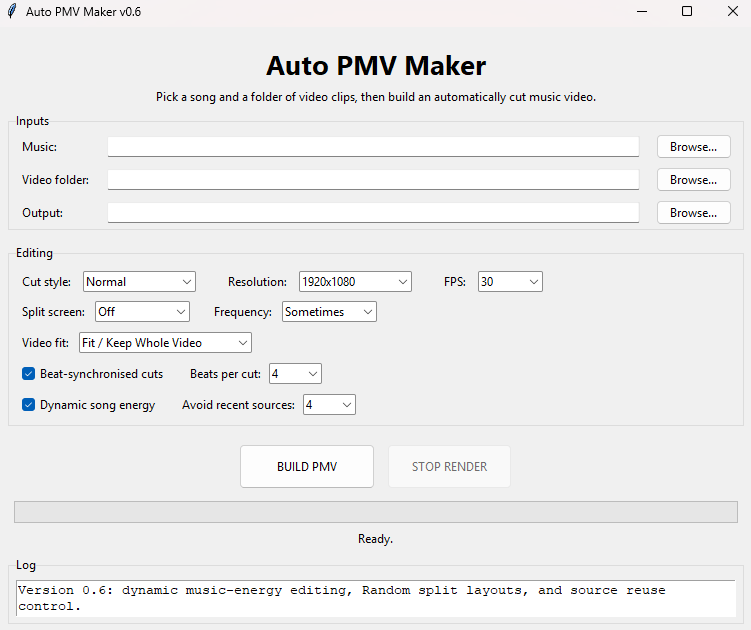
Auto PMV Maker is a Windows desktop tool that automatically analyses your chosen music, selects sections from your video collection, and creates an edited MP4 timed to the track.
No timeline editing required — choose your music, choose your video folder, adjust the style and hit BUILD PMV.
🎵 Beat-Synchronised Editing
Auto PMV Maker analyses the music to estimate its tempo and creates a beat grid that controls when clips change.
Choose between 1, 2, 4 or 8 beats per cut to go from rapid editing to longer, more relaxed shots.
⚡ Dynamic Music Energy
Enable Dynamic Song Energy and the editing style changes as the music changes.
Quieter sections receive longer, calmer cuts, while builds and high-energy sections automatically become faster and more intense.
🖥️ Automatic Split Screens
Create automatic:
- 2-panel side-by-side layouts
- 3-panel layouts
- 4-panel grids
- Random combinations of all three
You can control how frequently split screens appear with Rarely, Sometimes, Often or Always.
🎬 Mixed Video Formats
Different source videos don't always have the same shape, so Auto PMV Maker provides three framing modes:
Fit / Keep Whole Video — preserves the complete original frame.
Blur Background — keeps the full video visible while filling unused space with a blurred background.
Crop / Fill Screen — fills the entire output frame.
These modes also work inside split-screen panels.
🔀 Smarter Clip Selection
The editor can avoid recently used source videos so the same footage doesn't constantly reappear.
Broken, unusual or incompatible source clips are automatically skipped rather than stopping the entire render.
Features
- Automatic music analysis
- BPM/tempo estimation
- Beat-synchronised cuts
- Dynamic music-energy editing
- Automatic 2/3/4-way split screens
- Random split-screen mode
- Source-repeat avoidance
- Portrait and landscape video support
- 1280×720 and 1920×1080 output
- 30 FPS and 60 FPS output
- Stop/cancel rendering
- MP4 export
- Simple Windows desktop interface
Getting Started
- Choose a music track.
- Choose a folder containing your video clips.
- Select where the finished MP4 should be saved.
- Choose your editing options.
- Click BUILD PMV.
A good starting configuration is:
Normal • 1920×1080 • 30 FPS • Random Split Screen • Sometimes • Fit / Keep Whole Video • Beat Sync ON • 4 Beats Per Cut • Dynamic Song Energy ON
Requirements
Windows 10/11
FFmpeg is used internally for video processing.
Beta Release
This is currently v0.6 Beta.
The application has been tested with a variety of video files, but different codecs and unusual source media may behave differently. Feedback and bug reports are welcome.
Please only use video, audio and other media that you have the appropriate rights or permission to use.
Download
Click download now to get access to the following files:
Leave a comment
Log in with itch.io to leave a comment.